118 missions (AREU integration)
Info
Only available to Lombardy organizations under agreement with AREU, with the integration enabled in the Activities settings. You need the permission to view activities; to configure the integration, the one to manage them.
AREU (the Lombardy Regional Emergency Agency) offers partner organizations a web service with the details of the rescue missions they carried out. AppToMe queries it every hour and shows the missions in a dedicated tab, next to the shift and crew you had in AppToMe.
Two things to keep in mind, because they explain everything else:
- AREU data is read-only. Nobody edits it in AppToMe, not even an administrator: the source is the dispatch centre. If something is wrong, it is reported to AREU.
- A mission is not an activity. The activity is what the volunteer fills in; the mission is what AREU reports. They sit side by side and are compared, but no mission creates, edits or closes an activity.
Enabling the integration
From Activities, settings tab AREU integration.
| Field | Type | What it does |
|---|---|---|
| AREU import enabled | yes/no | turns on the hourly import |
| AREU service URL | text, required when enabled | the address AREU sent together with the credentials |
| SOREU | choice | the dispatch centre: Bergamo, Como, Milano or Pavia |
| EMMA organization code | text | the code the dispatch centre uses for the organization. Empty: derived from the username |
| AREU username / AREU password | text, required when enabled | the credentials issued by AREU |
| Starting mission ID | number | which mission to start from. Empty: imports the whole available history, then advances on its own |
| Reconcile missions with shifts and crews | yes/no | links every mission to its shift and flags inconsistencies (see below) |
| Shift time tolerance (minutes) | number | how far a mission may exceed the shift hours before being flagged |
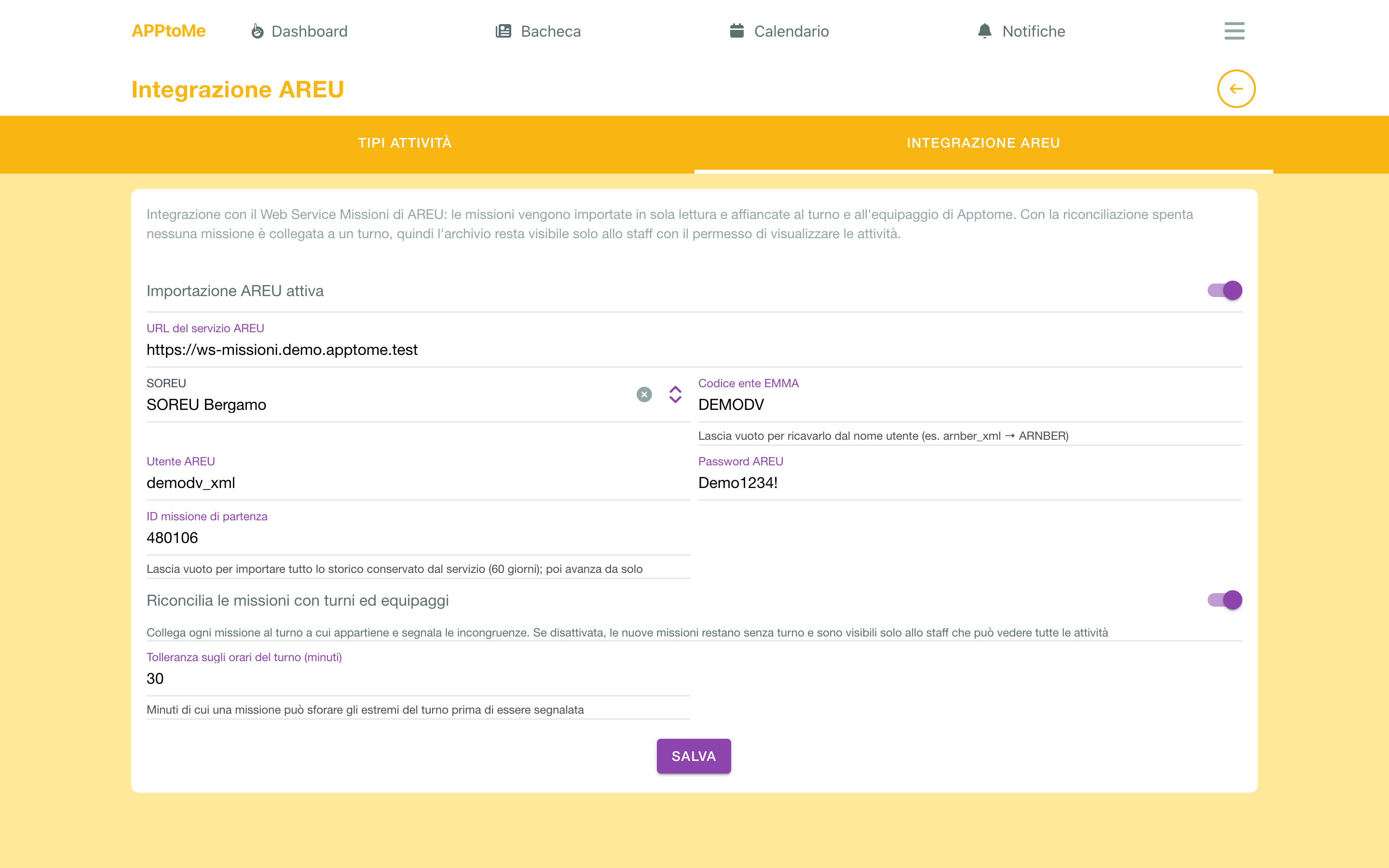
At the bottom, read-only: Last AREU sync and the last error, if any. If the date stops advancing, check the credentials: that is almost always the cause.
The first import brings the 60 days AREU keeps; from then on only new missions arrive, every hour. AREU completes a mission's crew and kilometres the following day, and AppToMe realigns them on its own.
The vehicle code
AREU identifies vehicles by an EMMA code (for example ARNBER_004.C), not by plate. On each vehicle's card, field EMMA vehicle code (118), enter that code: without it the mission shows Unknown vehicle and cannot be linked to any shift. See Vehicles.
Browsing missions
The 118 missions tab in Activities lists missions with Date, Reason, Municipality, vehicle, severity codes, Outcome, Km and reconciliation Status. You can filter by period and vehicle, and Anomalies only shows just those with something to check.
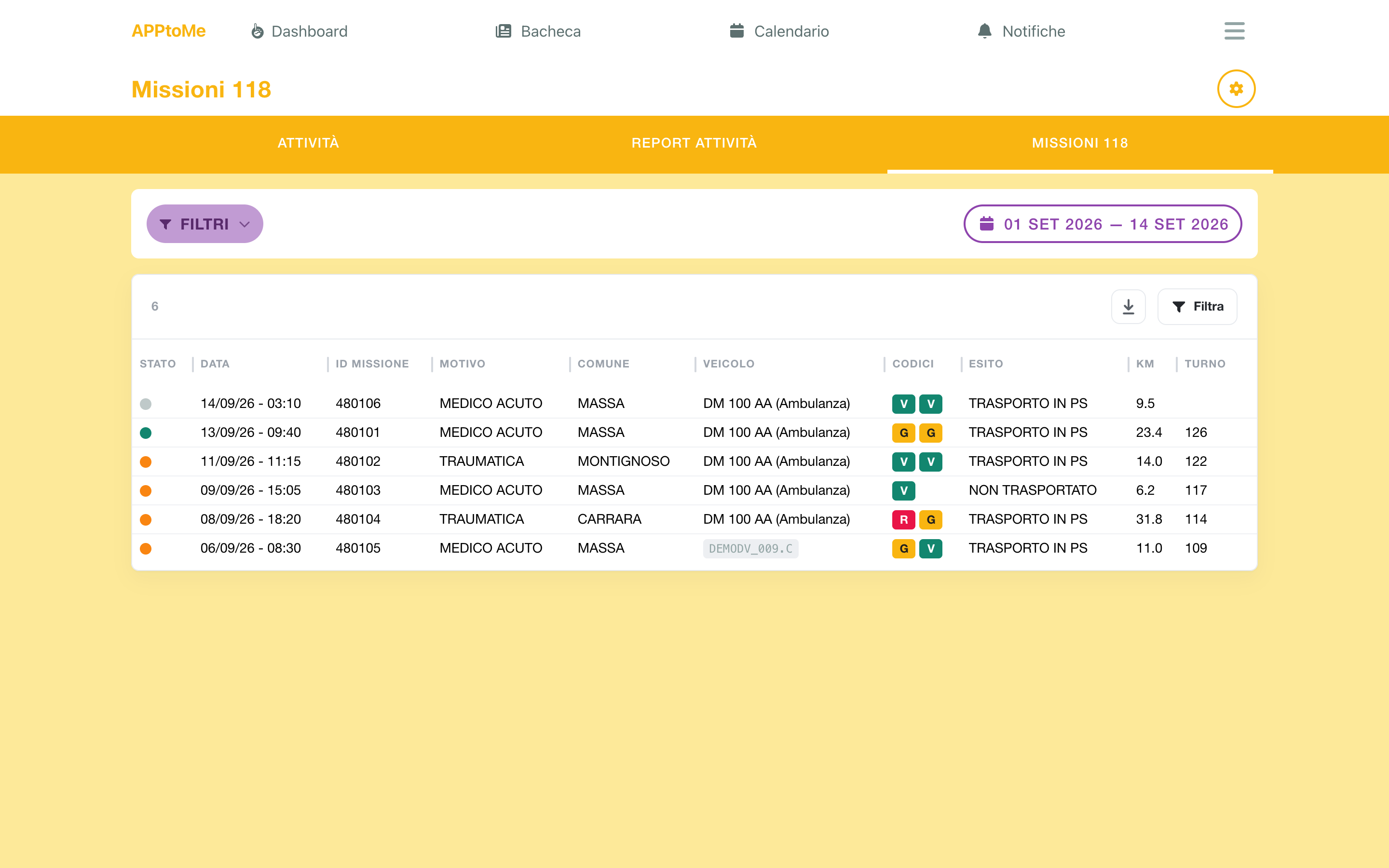
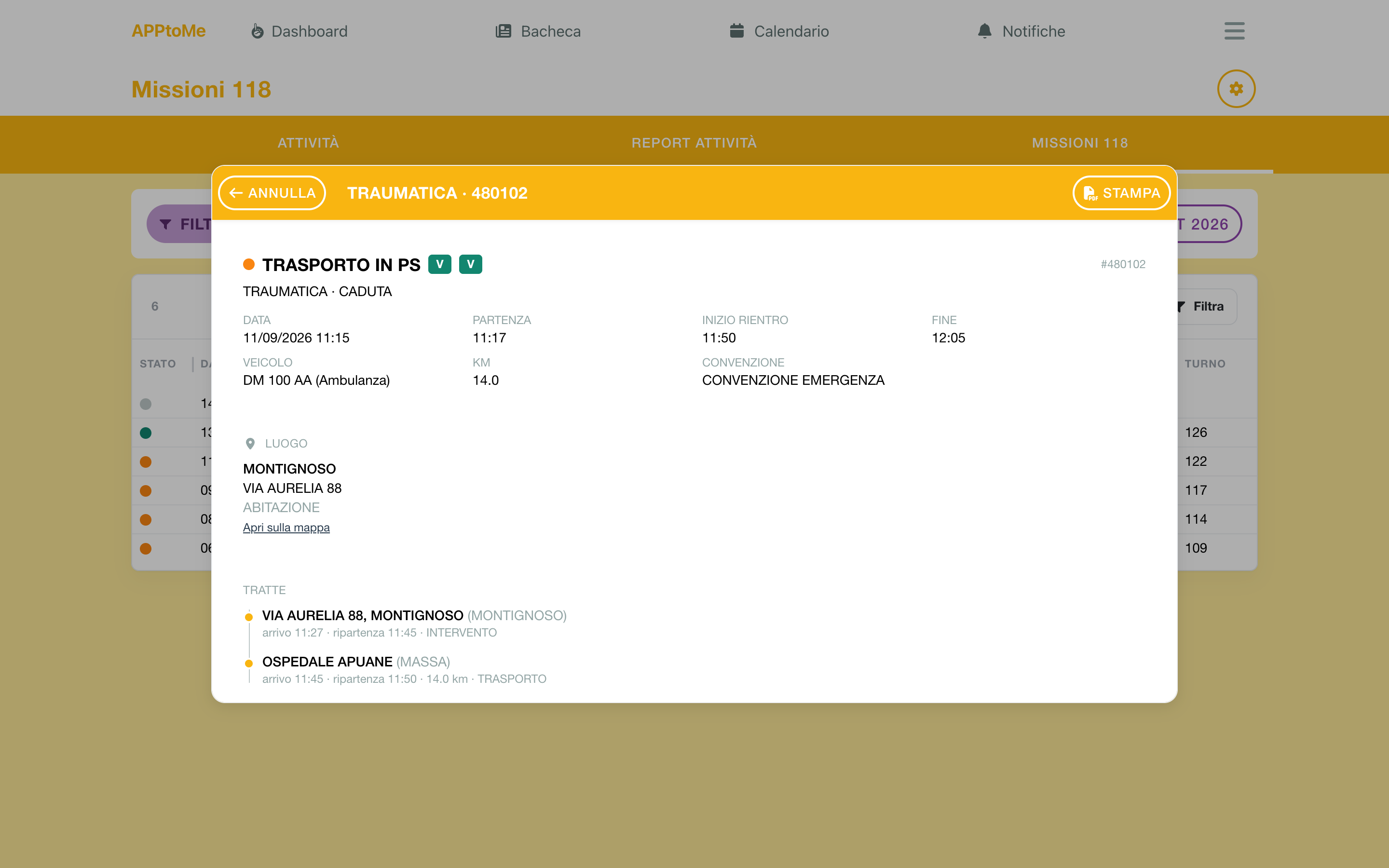
Tapping a row opens the detail, entirely read-only:
- the header with outcome, reason, codes and agreement;
- the Place, with Open on map when AREU transmitted coordinates;
- the Legs, in sequence: arrival and departure for each;
- the Crew declared to the dispatch centre, with name and role;
- the Patients, behind Show patients.
Patients are sensitive data
Every time someone presses Show patients, AppToMe records who did it and when. Open them only when really needed. Clinical data AREU no longer transmits (return code, pulse, breathing, consciousness) stays empty.
From the toolbar you export the list (Excel or CSV, with the current filters); from the detail you print the single mission as PDF.
Reconciliation
With Reconcile missions with shifts and crews on, AppToMe looks for the shift each mission belongs to — starting from the vehicle and the crew members — and compares who was on the shift with who AREU declares on board.
The result is the Status in the list:
| Status | Meaning |
|---|---|
| Shift reconciled | shift found, crew and vehicle match |
| Shift with anomalies | shift found, but something does not add up: the number says how many anomalies |
| No shift | no shift overlaps the mission, or the vehicle is unknown |
In the detail, the Reconciliation block shows the linked shift (with a link to open it) or No shift found, the list of anomalies and the date of the last recalculation.
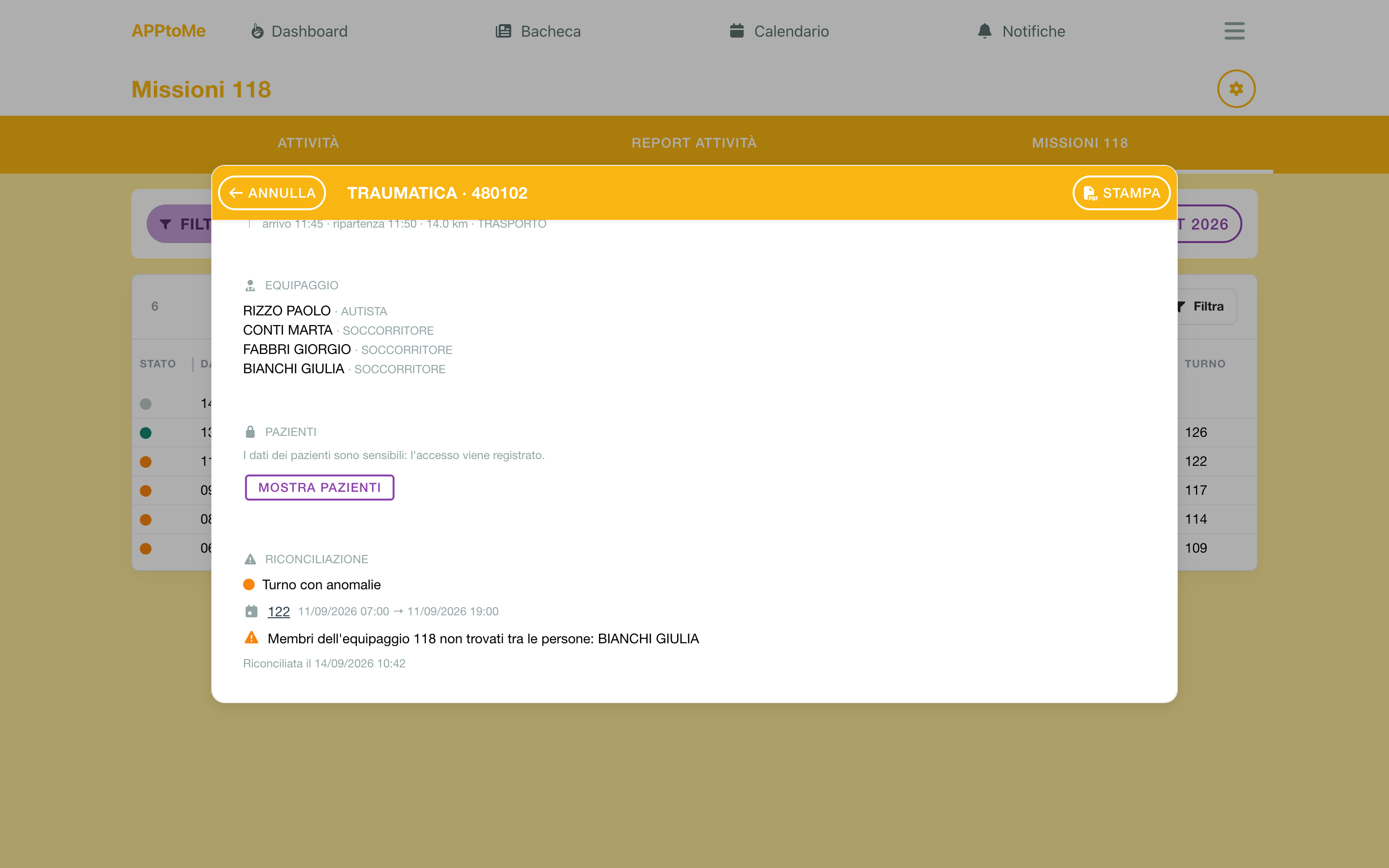
The anomalies AppToMe can recognize:
| Anomaly | What it means |
|---|---|
| EMMA vehicle code … does not match any vehicle | the code is missing on the vehicle's card |
| No shift overlaps the mission | that vehicle had no shift during the mission |
| Shift found from the vehicle only, the crew does not confirm it | the vehicle was on shift, but none of the people on board is on that shift |
| Shift found from the crew only, the vehicle does not confirm it | the people were on shift, but with another vehicle or none |
| Vehicle on shift …, crew on shift … | vehicle and people point to two different shifts |
| Several equivalent shifts overlap the mission | AppToMe picked the most overlapping one: check it is the right one |
| 118 crew members not found among people: … | AREU reports names matching nobody in the registry (different spelling, unregistered person) |
| 118 crew not on the shift: … | people declared on board but not signed up for the shift |
| On the shift but not in the 118 crew: … | people signed up for the shift that AREU does not list on board |
| Mission exceeds the shift boundaries by … minutes | the mission started before or ended after the shift, beyond the tolerance |
Reconciliation is informational: it does not change the shift, does not move availabilities, does not create activities. It is material for whoever checks services, not automation. Kilometres, outcomes and times are AREU data: shown, not judged.
Who sees what
Whoever has the permission to view activities sees all missions. Everyone else — the volunteers — sees in the same tab only the missions of the shifts they served on with an approved availability: reconciliation is what says whose a mission is, so a mission without a shift does not exist for them.
It follows that with reconciliation off no mission is linked to a shift and the archive stays visible to staff only. The integration settings and the EMMA code on vehicles require the corresponding manage permissions.