Vehicles
Info
Only available if the organization has at least one Bookable vehicle. The Vehicle bookings entry appears in the menu only in that case.
It is for taking one of the organization's vehicles for a need outside shifts: a pickup, a transport, a group outing.
Booking a vehicle
- From the menu open Vehicle bookings.
- Tap the + button at the bottom right. The first question is When do you need a vehicle?: set the Day, the From time and the To time.
- If you need it for several days, use Need it for several days? and set the End date. To go back there is Single day.
- Tap Next: the app shows the Vehicles free in this time slot, that is only those not already busy in a shift or in another booking. If there is none you read No vehicle available in this time slot: change time or day.
- Choose the vehicle and write the Reason for the request (for instance oxygen cylinder pickup). It is required.
- Tap Send request.
The request's fields, in order:
| Field | Type | What to write |
|---|---|---|
| Day | date, required | the day you need the vehicle |
| From / To | times, required | the time slot. If the end time is before the start time, return is expected the following day |
| End | date | appears only with Need it for several days?: the last day of the booking |
| Vehicle | choice, required | chosen among the Vehicles free in this time slot |
| Reason | text, required | why you need it (oxygen cylinder pickup). The approver reads it |
| Note | text | any other useful indication |
If the vehicle requires approval, the app warns that the request will be sent to the staff for approval: it stays Pending until a manager decides.
Following your bookings
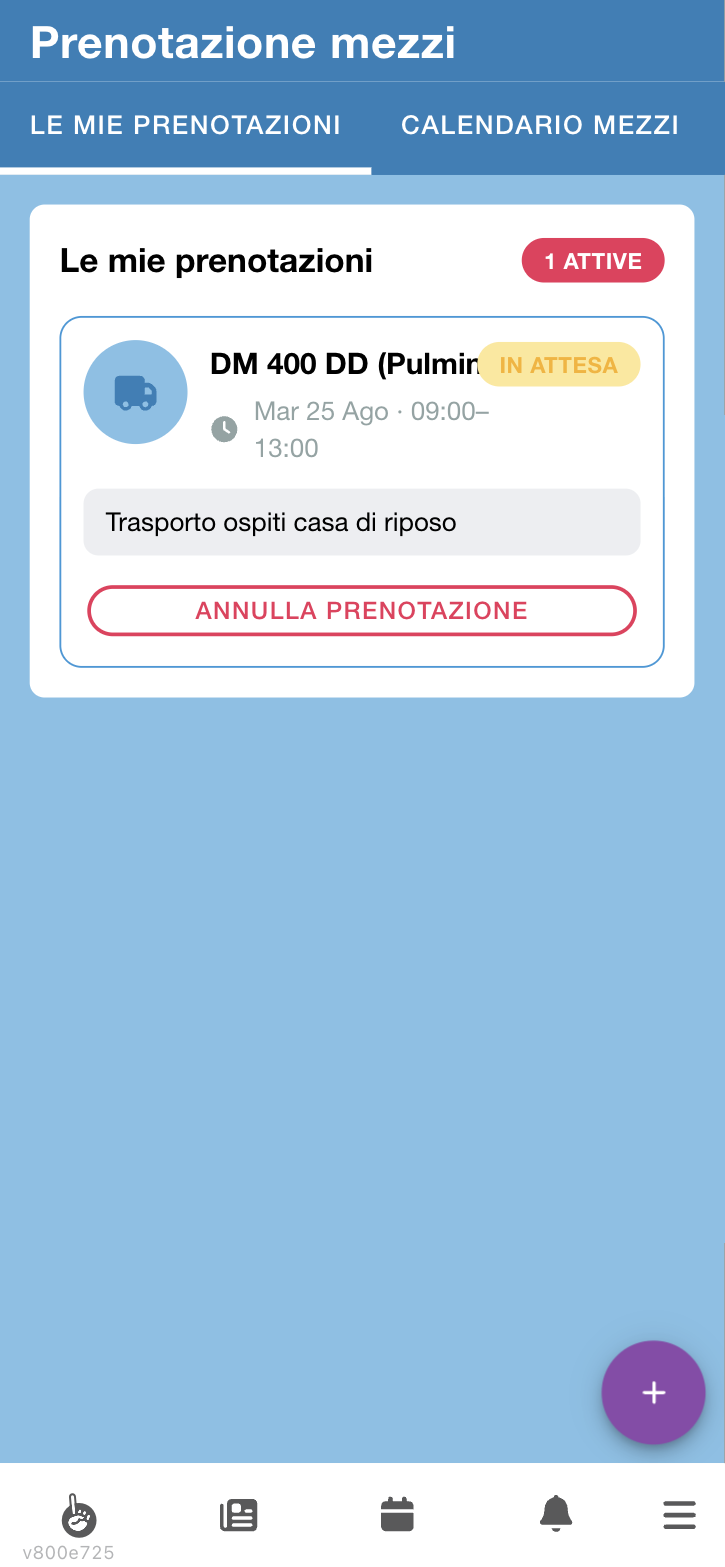
In Vehicle bookings you find two tabs:
- My bookings — the ones you requested, with how many you have active next to the title; each card shows the vehicle, the time slot, the reason, the status and the Withdraw booking button
- Vehicle calendar — vehicle availability over time
History also appears when you have closed bookings.
In the calendar the colours tell apart Confirmed booking, Awaiting approval and Assigned to a shift: the last one is the vehicle taken by service shifts, which have priority. In pink, Out of service, the vehicles stopped for a breakdown or maintenance.
A booking's statuses are:
| Status | What it means |
|---|---|
| Pending | a manager's approval is needed |
| Approved | the vehicle is yours for that slot |
| Rejected | the request was not granted |
| Withdrawn | you withdrew it, or the vehicle managers cancelled it |
| Expired | the time passed without a decision |
How it works
A vehicle is busy for three reasons, not one: because someone else has booked it, because it is assigned to a shift in that slot, or because it is out of service. The list of free vehicles takes all three into account, and it is the same rule that draws the Vehicle calendar: what you see busy there is exactly what will not be proposed to you.
Adjacent times do not overlap. A booking from 10 to 12 and one from 12 to 14 coexist without problems: the return time is also the time the vehicle becomes available again.
Not every vehicle can be booked. Some are not bookable at all, others are reserved for members of certain groups. If a vehicle you know does not appear among the free ones even at empty times, this is probably why, not an error.
Some vehicles need no approval: the booking shows as Approved right away and the vehicle is yours. For the others a request goes to the vehicle managers.
Availability is checked again at approval time. Between the request and the sign-off the vehicle may have been taken by a shift or another booking: in that case the approval does not go through. That is why, when you really need the vehicle, it is best to ask in advance.
A shift beats a pending request. If a manager assigns that vehicle to a shift while your request is still Pending, the request is cancelled and you receive a notification. A booking already Approved, on the other hand, is not touched: it is a commitment that was confirmed to you.
A red warning is not a ban. If the organization uses the Vehicle management module, a warning may appear next to a free vehicle: Insurance expired on …, Reported unfit on …. You can still book the vehicle, but check with whoever manages the vehicles first.
Forgotten requests expire. If nobody decides by the end of the requested slot, the booking shows as Expired and you are told: it does not sit there clogging the managers' queue.
Vehicles out of service
When a vehicle has broken down, is at the garage or is off the road after an accident, the vehicle managers put it out of service: for a period, or until further notice.
- For the whole period the vehicle does not appear among the Vehicles free in this time slot, even if nobody has booked it.
- In the Vehicle calendar the stop is a pink band, Out of service. Tap it to read the reason (Breakdown, Maintenance…) and any note.
If the vehicle was already yours, you receive the notification The vehicle you booked is out of service: … is out of service. The booking has not been cancelled: check with whoever manages the vehicles. Tapping it opens My bookings.
The booking stays there, with its status, but do not count on that vehicle: talk to the vehicle managers. They can move you to another vehicle or another time, and in that case you receive the notification of the change. If you no longer need the vehicle, withdraw the booking yourself with Withdraw booking.
Withdrawing a booking
Open it from My bookings and tap Withdraw booking, then confirm (Do you want to withdraw this booking?). The vehicle becomes free for others: do it as soon as you know you no longer need it.
The vehicle managers can edit or cancel your booking: if they do, you receive a notification.
Error messages
| Message | What it means |
|---|---|
| The end must be after the start | you swapped the times |
| You can't book a vehicle in the past | the chosen date has already passed |
| Please state the reason for the request | the Reason field is required |
| No vehicle available in this time slot | they are all busy, change the slot |
| The vehicle is already booked in this time slot | someone got there before you while you were filling in |
| The vehicle is already assigned to a shift in this time slot | the vehicle is needed for service: shifts have priority |
| The interval is too long | a booking cannot exceed one year: you probably got the end date wrong |
| This vehicle cannot be booked | it is not bookable, or it is reserved for a group you are not part of |
| The vehicle is out of service in this time slot | the vehicle was stopped for a breakdown or maintenance while you were filling in: choose another one or change the slot |