Your card
Your card is the collectible card of your service: it is born at your first shift of the year and grows stronger as you give time. It serves no practical purpose: it is there to say thank you, and to let you see how much you have done.
Where to find it
- In the menu, under Your card, right below You are operating in. Next to it is the card's power.
- On the Dashboard, in the violet band at the top: tap it to open the card.
- In the notification about its birth, a power-up or something new on the card: tap it and the card opens, in the right organization.
A red dot next to the card means there is something new to see.
How it is born
Every year a new card is born at your first volunteer shift, once approved and over. You get one for each organization you serve in.
- Shifts as an employee do not count: the card tells your volunteer service.
- The number on the card (for example No. 007) tells the order in which it was born in your organization's season.
- When it is born you get the notification Your season card is here.
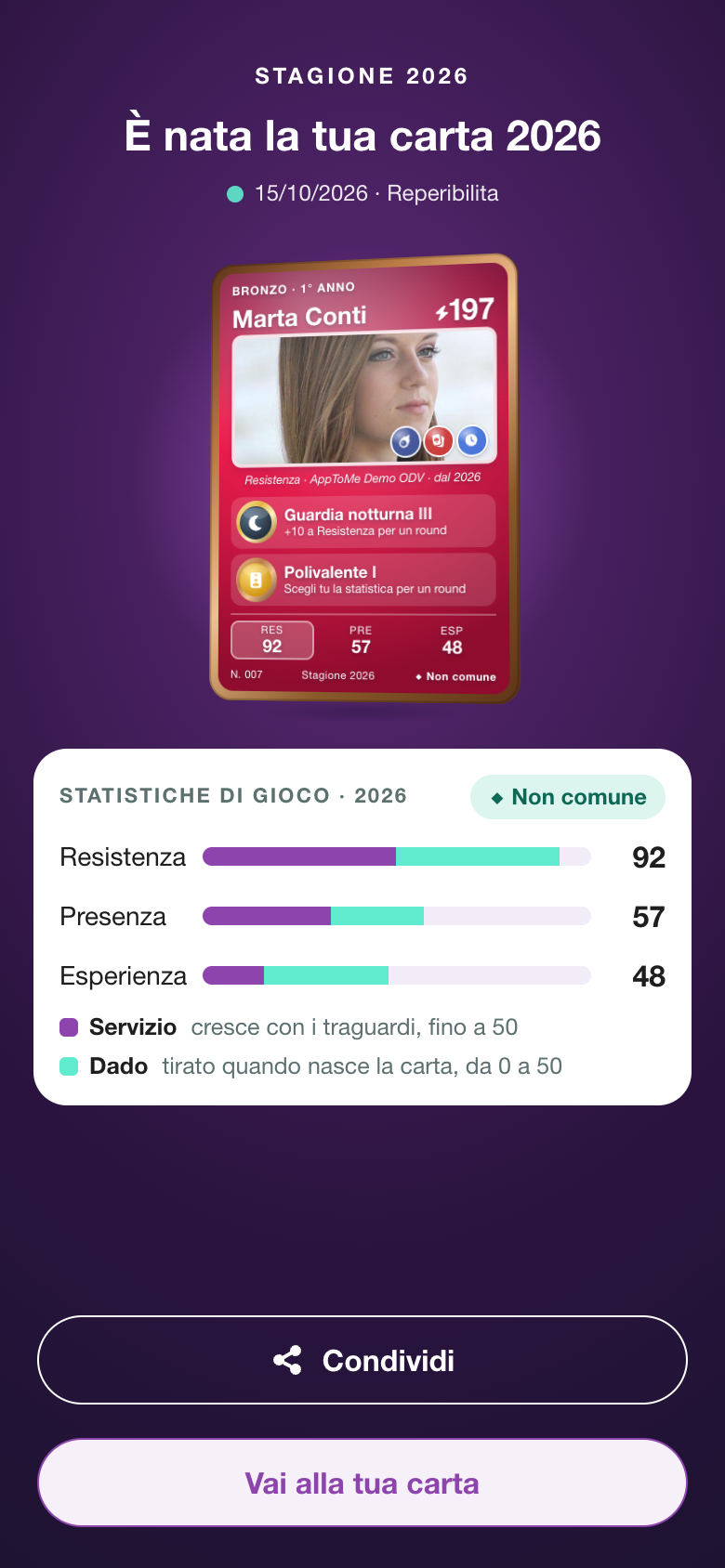
Open the card: the first time it is covered, with Your 2026 card is ready. Tap Open the card: the card is uncovered, the stat bars fill up and its rarity appears. Then you can Share or Go to your card.
Before your first shift
Until the card is born you see a placeholder card, with your name, your photo and The card is born at the first shift. Below it you read Your 2026 card is born at your first shift and your next shift on the calendar, or No shifts on your calendar this year yet.
If you only serve as an employee in the organization, in place of the card there is the Employee card, without stats.
A new card every year
At the first shift of the new year a new card is born on its own, with its birth to open. The milestones you reached in earlier years stay yours and count on the new card too: the card never goes back.
What is on the card
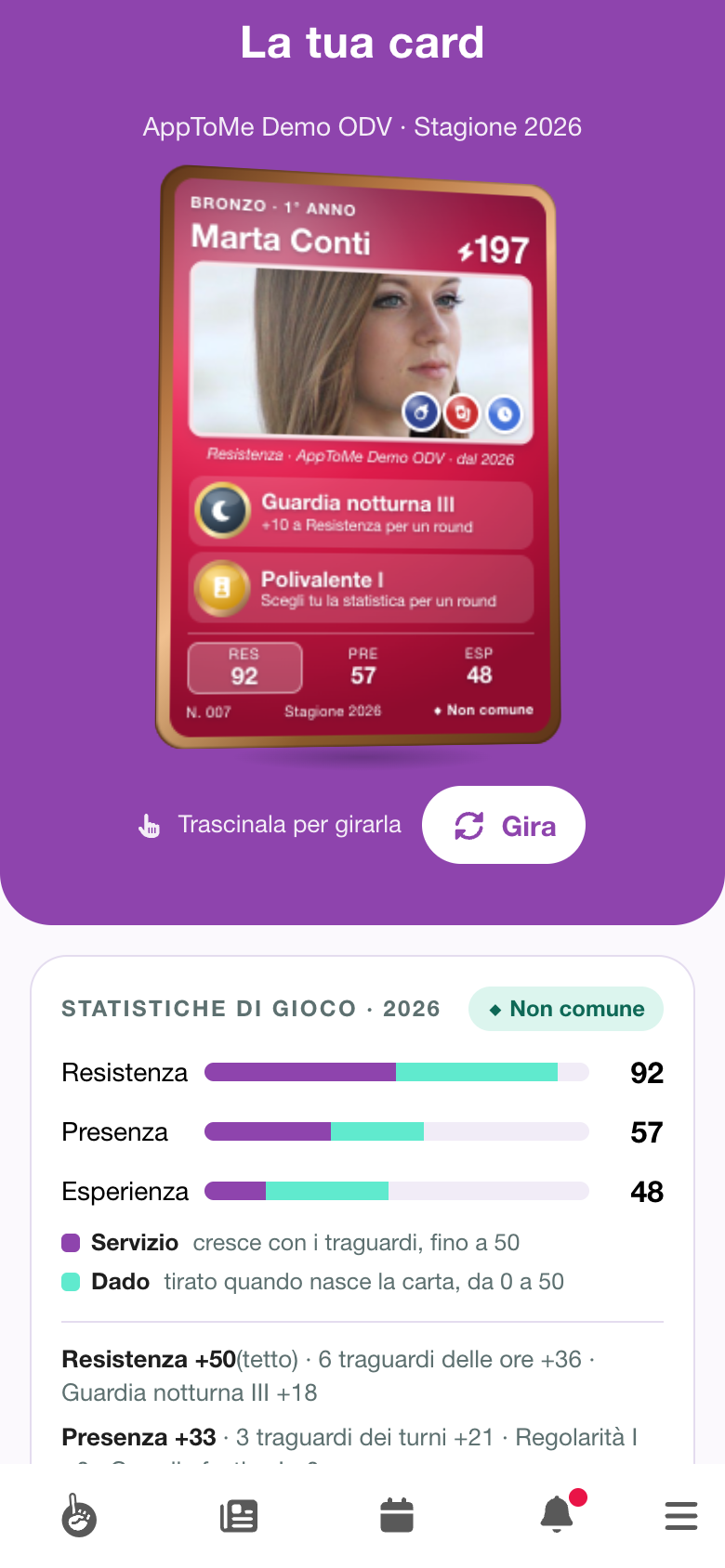
On the front, from the top:
- the frame and the years of service, for example Bronze · year 1;
- your name and the power, with the lightning bolt: it is the sum of the three stats;
- your photo, with the last three feats you earned on its corner, and below it the strongest stat and the organization;
- two abilities: those of the highest level and, on a tie, the most recent. Until you have two, the empty place shows Ability to discover;
- the three stats in short, END, PRE and EXP, with the strongest one highlighted;
- the number, the season and the rarity.
The card's colour is that of the strongest stat. On the back are the day it was born and the shift that brought it to life.
Drag the card sideways to turn it, or tap Flip.
The game stats
There are three stats: Endurance, Presence and Experience. Each goes up to 100 and is made of two parts, shown in two colours in the bar:
- Service — grows with milestones, up to 50;
- Dice — rolled once, when the card is born, from 0 to 50.
| Stat | Grows with | Points |
|---|---|---|
| Endurance | hours of service: 10, 50, 100, 250, 500, 1000, 2500 and 5000 hours; the Night watch ability | +6 for each hours milestone, +6 for each Night watch level |
| Presence | shifts: 10, 25, 50, 100, 250, 500 and 1000 shifts; the Regularity and Holiday watch abilities | +7 for each shifts milestone, +6 for each level of the two abilities |
| Experience | the years with at least one shift; the All-rounder, Certifier and Training abilities | +4 per year, up to 10 years; +6 for each level of the three abilities |
Under the bars you read where each point of service comes from, for example Presence +33 · 3 shifts milestones +21 · Regularity I +6 · Holiday watch I +6. When the milestones of a stat go past 50 points, (cap) appears next to the total: the extra points do not count.
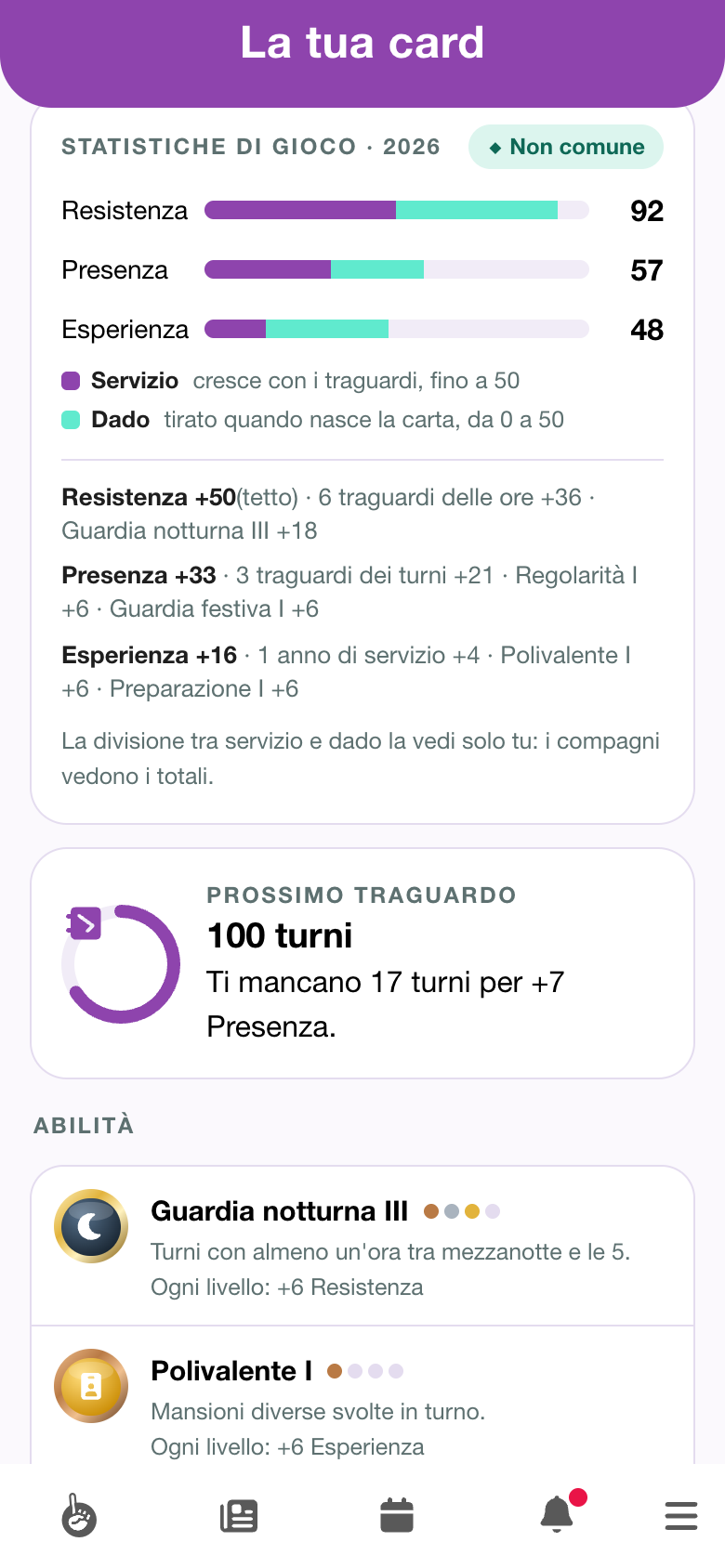
Further down you find:
- Next milestone — the closest milestone, with how far you are from it: 17 shifts to go for +7 Presence.
- Abilities — all the abilities, see The abilities.
- Feats — the stickers you earned and the ones still to earn, see Feats.
- Frame — it depends on the years with at least one shift: Bronze in year 1, Silver from 2 to 4 years, Gold from 5 to 9, Platinum from 10 on.
- Share the card, see Sharing the card.
- Rules — all the rules of the card: tap to open them.
The dice and the rarity
When the card is born, a die is rolled for each stat. The roll stays the same for the whole season: the next year a new card is born, with a new roll.
The rarity is decided by the sum of the three rolls:
| Rarity | Sum of the rolls |
|---|---|
| Legendary | from 130 |
| Rare | from 105 |
| Uncommon | from 75 |
| Common | below 75 |
Rare and legendary cards are holographic.
The abilities
Abilities reward a way of doing service. There are six, and each has four levels, from I to IV: each level is worth +6 on its stat.
| Ability | What counts | Levels I–IV | Stat |
|---|---|---|---|
| All-rounder | Different tasks performed on shift. | 2, 3, 5 and 8 tasks | Experience |
| Night watch | Shifts with at least one hour between midnight and 5 am. | 1, 10, 50 and 100 nights | Endurance |
| Regularity | Months with at least four shifts on the same weekday (three, when that day comes only four times in the month). They need not be in a row. | 1, 3, 6 and 12 regular months | Presence |
| Holiday watch | National holidays, Easter and Easter Monday included, with at least one hour of service. | 1, 3, 7 and 15 holidays | Presence |
| Certifier | Checklists you certified. | 1, 10, 50 and 100 certified checklists | Experience |
| Training | Certifications acquired. | 1, 3, 5 and 10 certifications | Experience |
Info
Certifier only appears if the organization uses the Checklists module, Training only if it uses the Courses module.
Like the hours and shifts milestones, abilities count your whole history in the organization: a level reached stays yours on the cards of the following years too.
On the card's page, under Abilities, you find them all:
- the ones reached, with their level, the dots of the four levels and what each one is worth, for example Each level: +6 Endurance;
- the ones still at zero, in grey, with how far you are from the first level, for example 1 checklist to certify for +6 Experience.
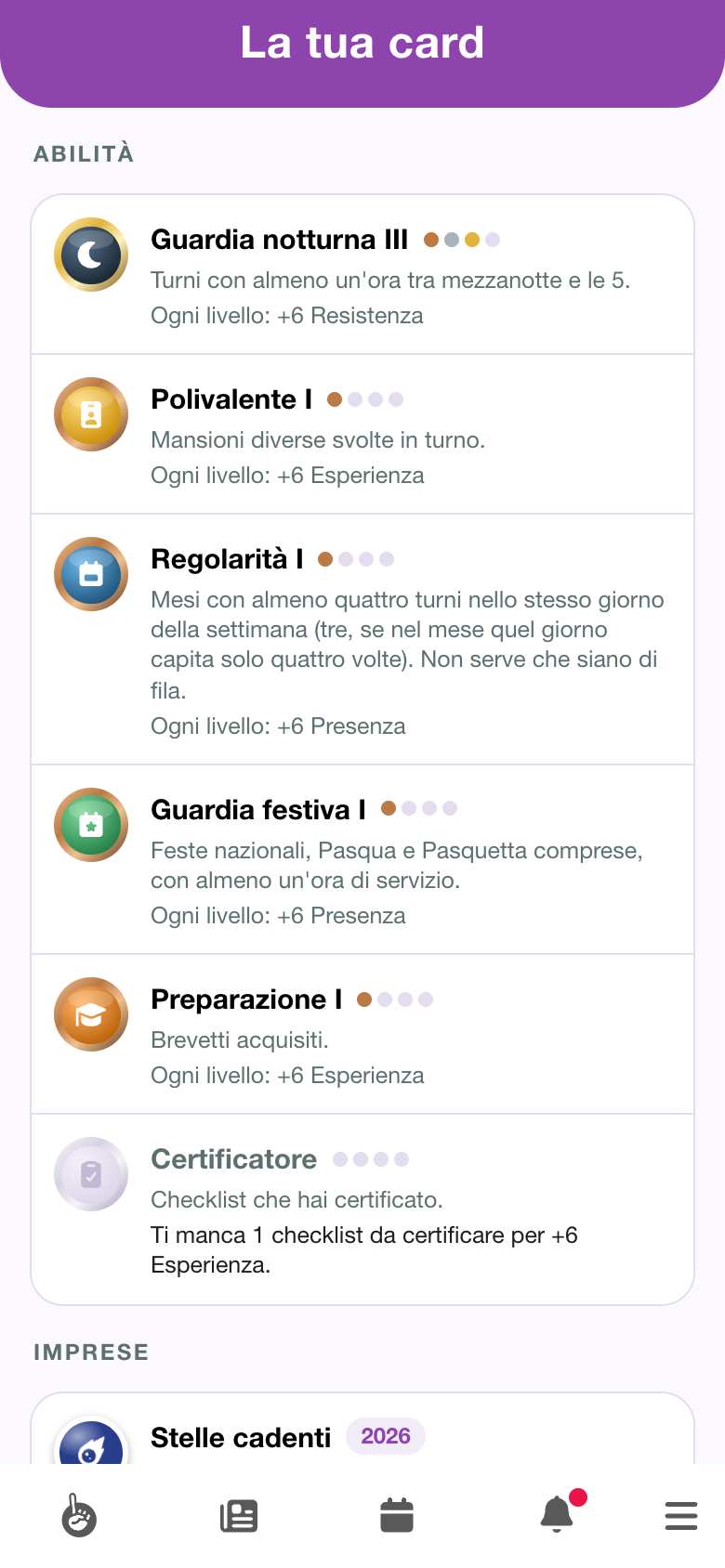
A new level is a power-up like the others, see When the card grows. The levels you had already reached before the new abilities arrived are already on the card, without a notification.
When the card grows
When you reach a milestone, or a level of an ability, the card gains points: it is a power-up. You get the notification Your card got stronger. Open the card: under Your card got stronger you see the milestone reached and how much the stat went up, for example Holiday watch I and +6 Presence · 51 → 57. If there is more than one power-up, move to the next with Next.
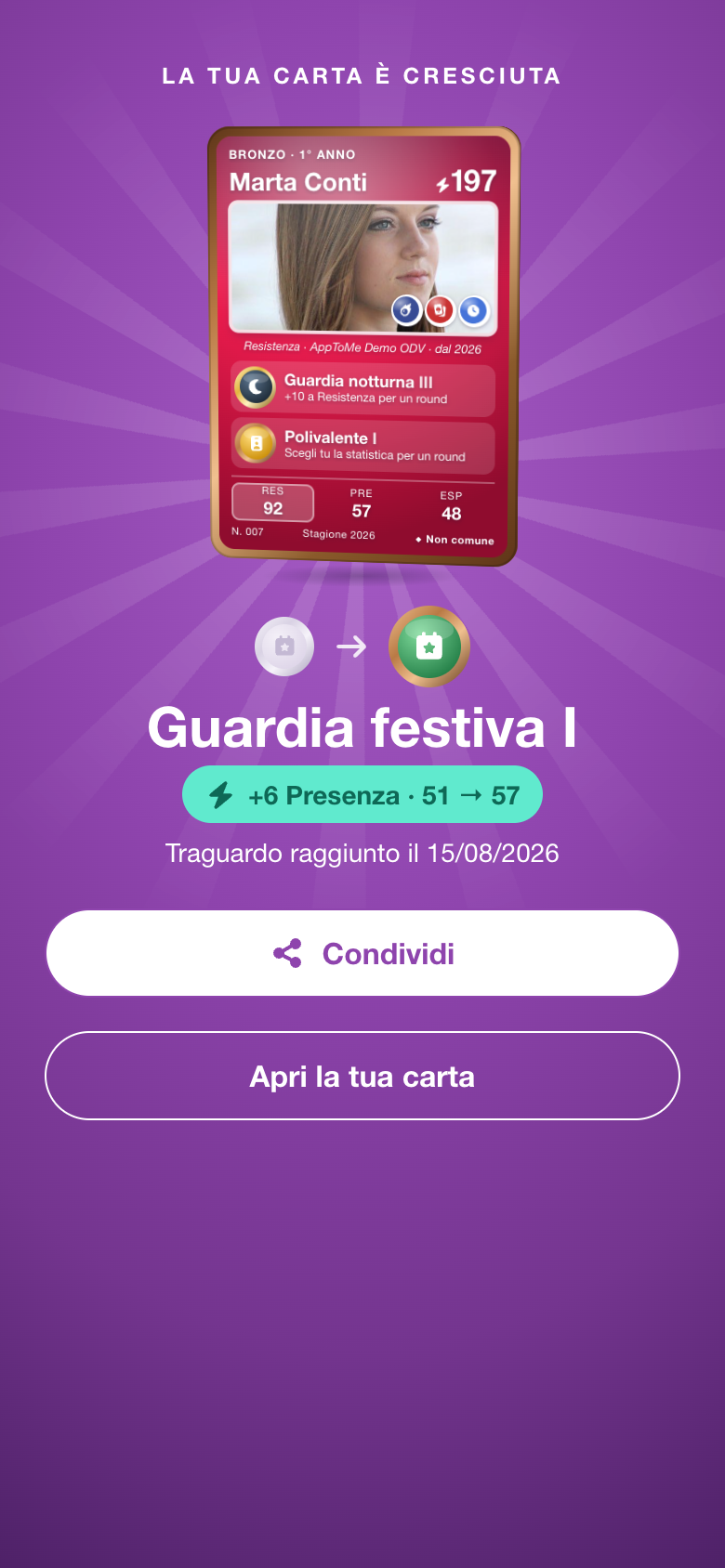
AppToMe checks the card about every quarter of an hour, for whoever has just finished a shift: the power-up arrives within about a quarter of an hour of the end of the shift, not instantly. A shift only counts if your availability was approved. If a shift brings you several new things at once, you get a single notification.
Feats
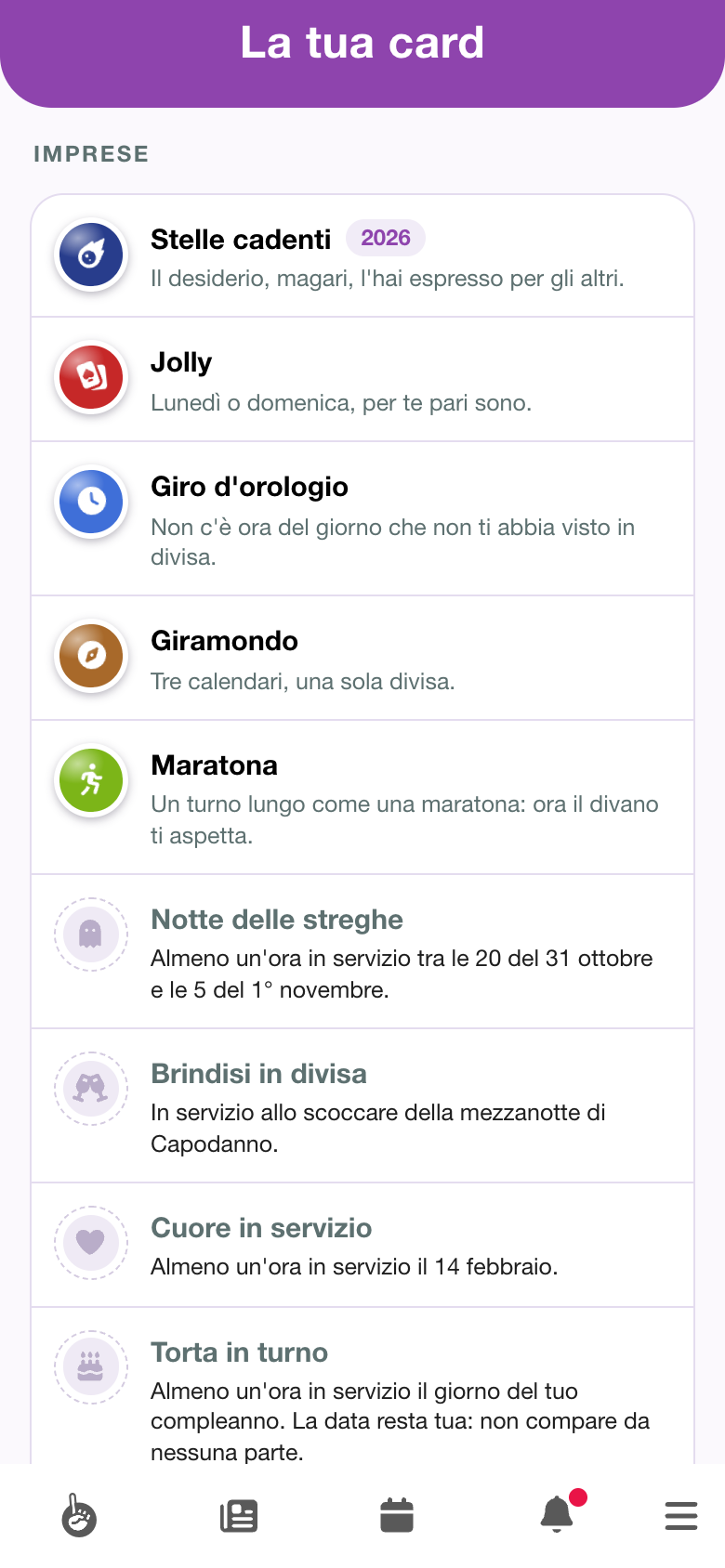
Feats are collectible stickers: you earn them with a particular shift, like Halloween night or a very long shift. They give no points and do not change the stats: they remember a moment.
- The calendar ones come back every year and carry the year in their name, for example Shooting stars 2026.
- The career ones come only once.
The same shifts count as for the card: as a volunteer, approved and over.
Calendar feats
| Feat | How to earn it |
|---|---|
| Witches' Night | At least one hour on duty between 8 pm on 31 October and 5 am on 1 November. |
| Toast in uniform | On duty as the clock strikes midnight on New Year's Eve. |
| Heart on duty | At least one hour on duty on 14 February. |
| Cake on shift | At least one hour on duty on your birthday. The date stays yours: it never shows anywhere. |
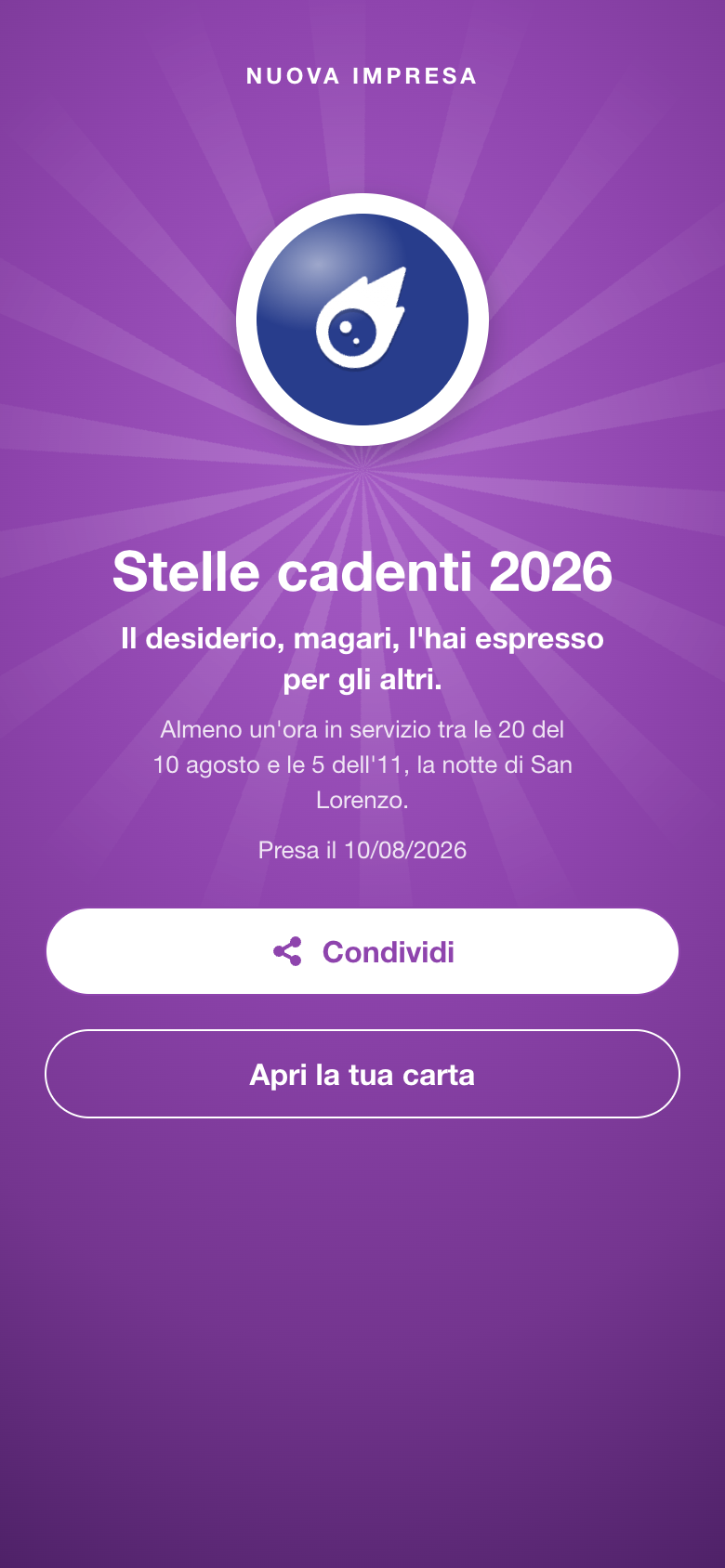
| Shooting stars | At least one hour on duty between 8 pm on 10 August and 5 am on the 11th, the night of San Lorenzo. |
| Confetti | At least one hour on duty on Shrove Tuesday. |
| Trailblazer | On your organization's first volunteer shift of the year. |
Career feats
| Feat | How to earn it |
|---|---|
| Joker | Shifts on all seven days of the week in the same year, even in different weeks. |
| Round the clock | Your shifts, put together, have covered all 24 hours of the day. |
| Marathon | A single shift of at least 12 hours. |
| Globetrotter | Shifts in at least three different calendars. |
| Anniversary | A shift on the day of your first shift, in a later year. |
| Twelve out of twelve | At least one shift in every month of the same year. |
| Four seasons | Shifts in winter, spring, summer and autumn of the same year. |
Cake on shift only appears if your record has your date of birth; Globetrotter only in organizations with at least three calendars.
Secret feats
Besides these there are three secret feats. Until you earn them you only see a question mark and Secret feat, with no name and no rule: you find them out by earning them.
Where you see them
- On the card's page, under Feats: the ones you earned in colour, with a line to make you smile and, for the calendar ones, the years you earned them; the others in grey, with the rule to earn them; the secret ones with the question mark.
- On the front of the card, on the corner of the photo: the last three you earned.
- On the card your teammates see: they know which feats you have, but not when you earned them.
When you earn a new one you get a notification. Open the card: after any power-ups, New feat shows the sticker, its name, a line to make you smile, how to earn it and the day you earned it (Earned on …). If there is more than one, move to the next with Next. Then you can Share or Open your card.
The feats earned with shifts from before feats arrived are already on the card; those of the current year are celebrated with their scene the first time you open it.
The Christmas look
A volunteer shift that starts between 24 and 26 December 2026 gives your 2026 season card its Christmas look: a holographic look, with the same stats. The game does not change, and the look stays on the card.
When the card gets it you receive a notification. Open the card: Limited edition shows the card in its new look, with Christmas 2026 and A shift between 24 and 26 December gave your card its Christmas look: same stats, and the look stays on the card. Then you can Share or Open your card.
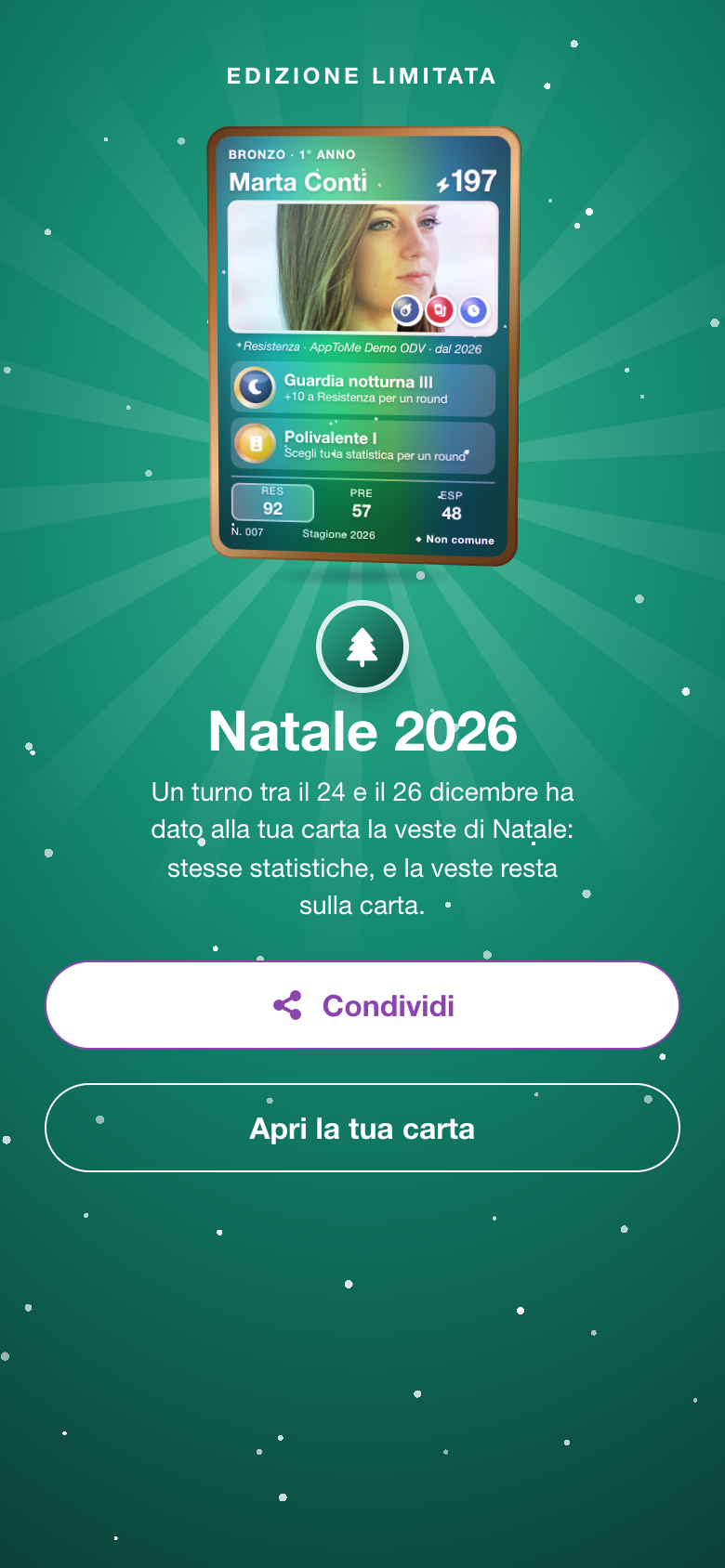
On the card's page, above the card, next to the season you read Christmas 2026. The look shows wherever your card appears: on the Dashboard, in the story to share and when your teammates look at it.
Sharing the card
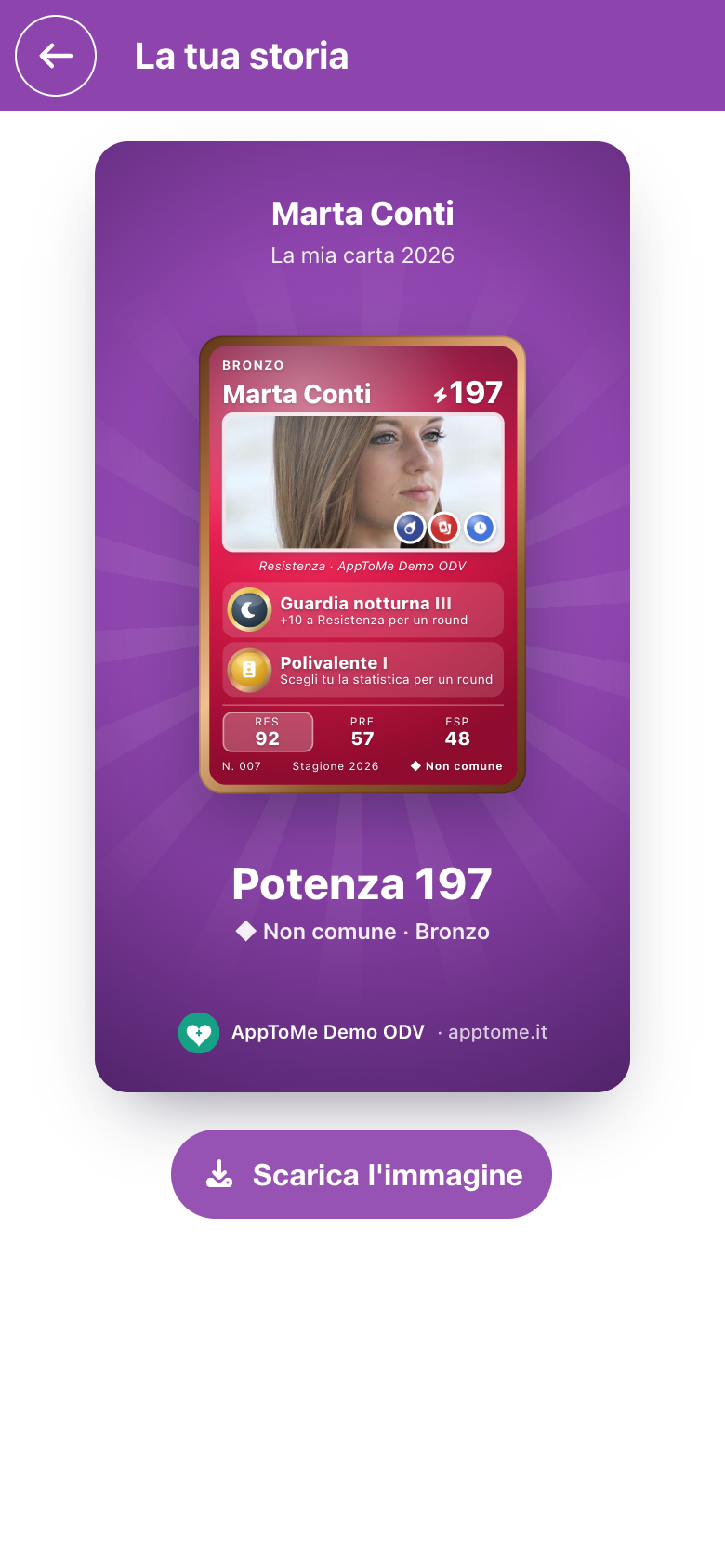
Tap Share the card, or Share after a birth, a power-up, a new feat or the Christmas look. Your story opens: a vertical image with your name, the card, the power, the rarity, the frame and the organization's symbol.
- On the phone, Share opens the phone's menu to send it wherever you like.
- From a computer's browser, Download the image saves it on the computer.
The story shows neither your hours nor your years of service.
Your teammates' cards
In a shift's detail, tap a teammate's face or name: their card comes to the front, with The shift's crew below it. Swipe sideways to move to the next teammate; tap outside the card to go back to the shift.
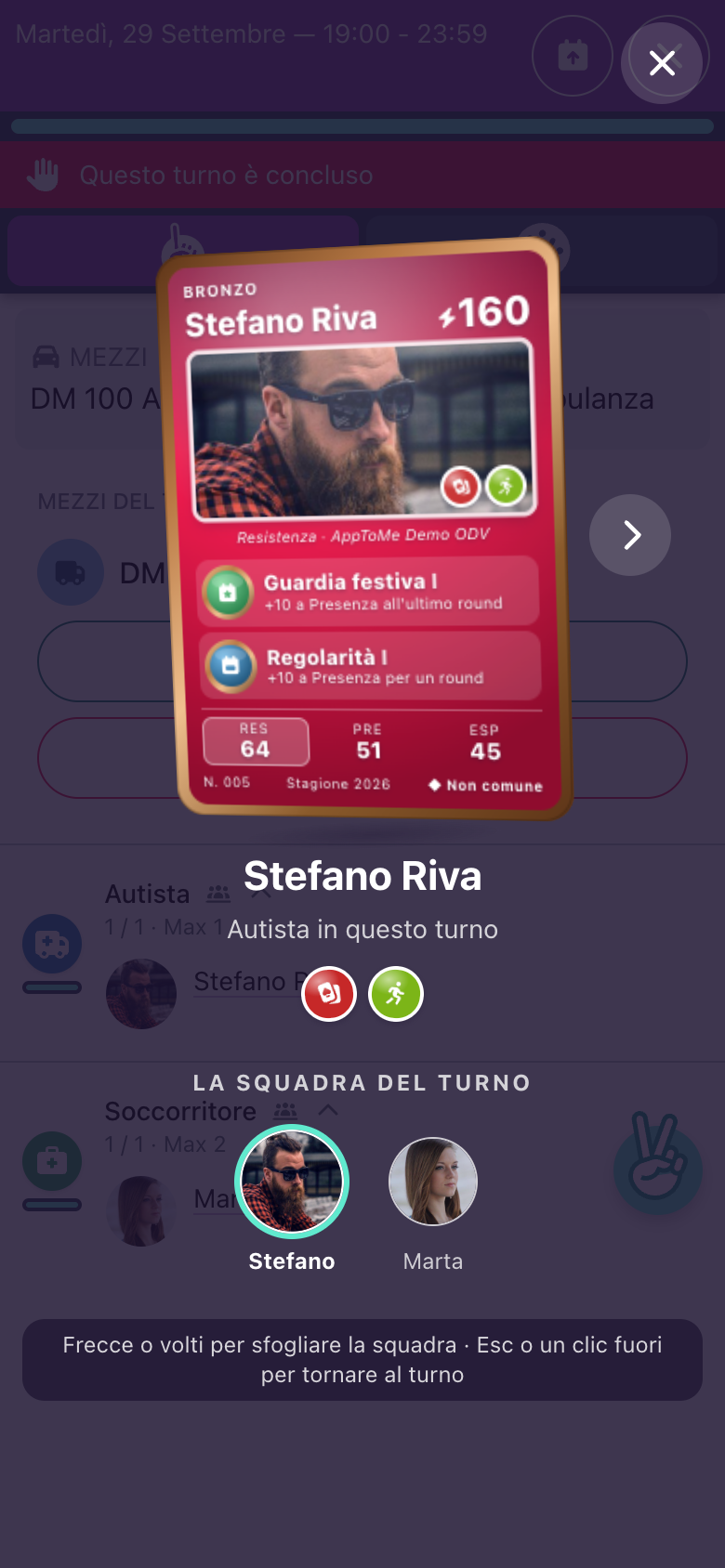
Everyone in the organization sees your card, but only with the totals: the split between service and dice, your hours and your shifts are for you alone. Your teammates see the abilities you reached, not the ones still at zero, and the feats you have, without dates. Staff also see it in the Registry: in your record and among the organization's Cards, where they also see whether you have opened it yet.
Before the season opens
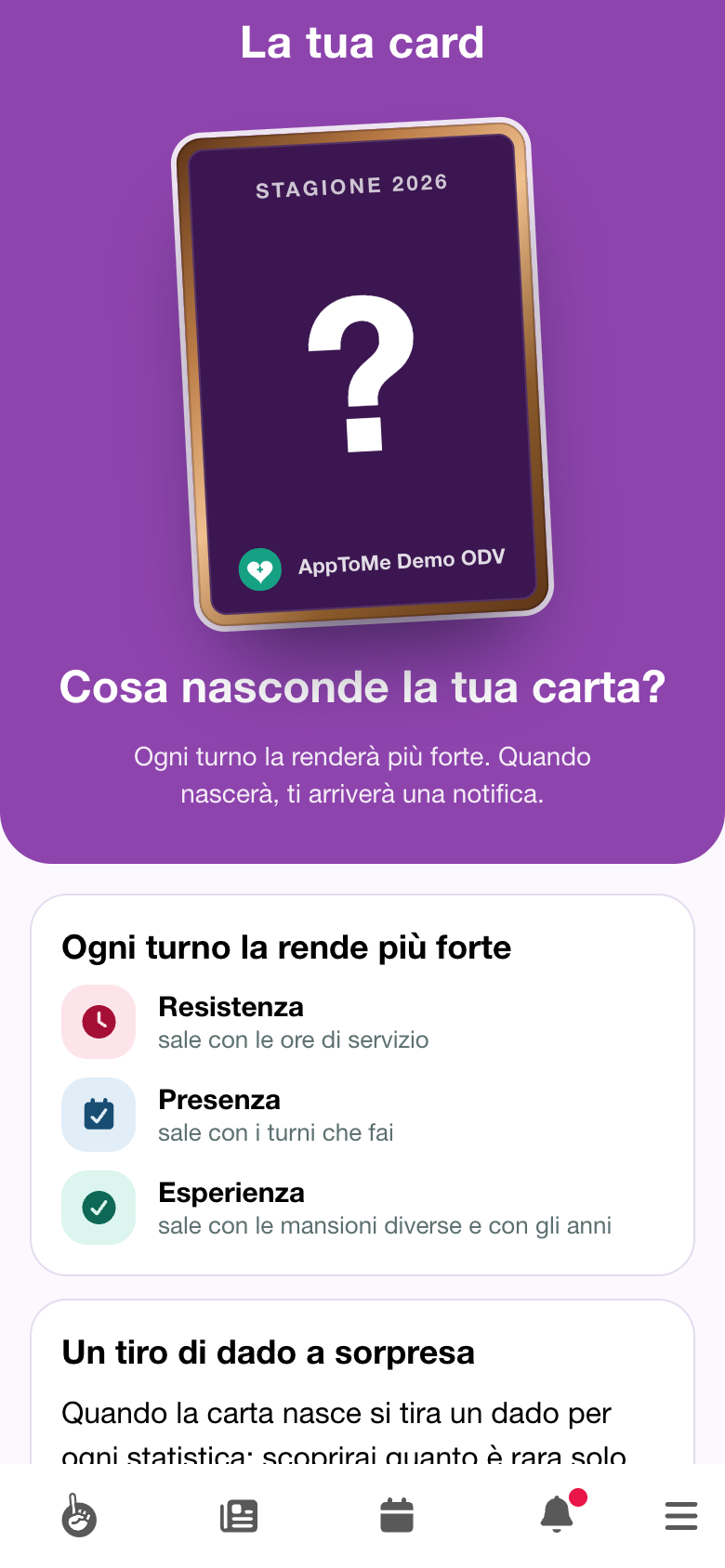
The card arrives in each organization when the season opens. Until then the card is covered: on the Dashboard you see Your volunteer card, with Every shift will make it stronger. and the three stats with a question mark.
Opening it you read What is your card hiding?, how it will grow, the surprise dice roll, the rarities and the Rules. At the bottom, Your pins opens the pins you have collected so far.
When the season opens, the card is born for whoever has already done volunteer shifts in the year, and you get the notification.
What about the pins?
The card takes the place of the pin collection. Pins are no longer collected: the hours, shifts and tasks milestones that had earned you a pin become power-ups of the card, so you lose nothing. Once the season is open, the old links to the pins lead to your card.
One card per organization
Each organization has its own card, with its own milestones, abilities and feats: the hours you do in one do not make the other's card grow. If you are in more than one organization, on the Dashboard you see a row for each card: tap a row to enter that organization and open its card.