Courses
Info
Only available if the organization uses the Courses module.
Courses are the organization's training: a series of lessons which, if attended, can lead to a certification.
Finding a course
Open the Board and switch to the Courses tab. Every course is a card with the certification it grants, the place, the start and end dates, the duration in hours and, at the top, until when subscriptions stay open.
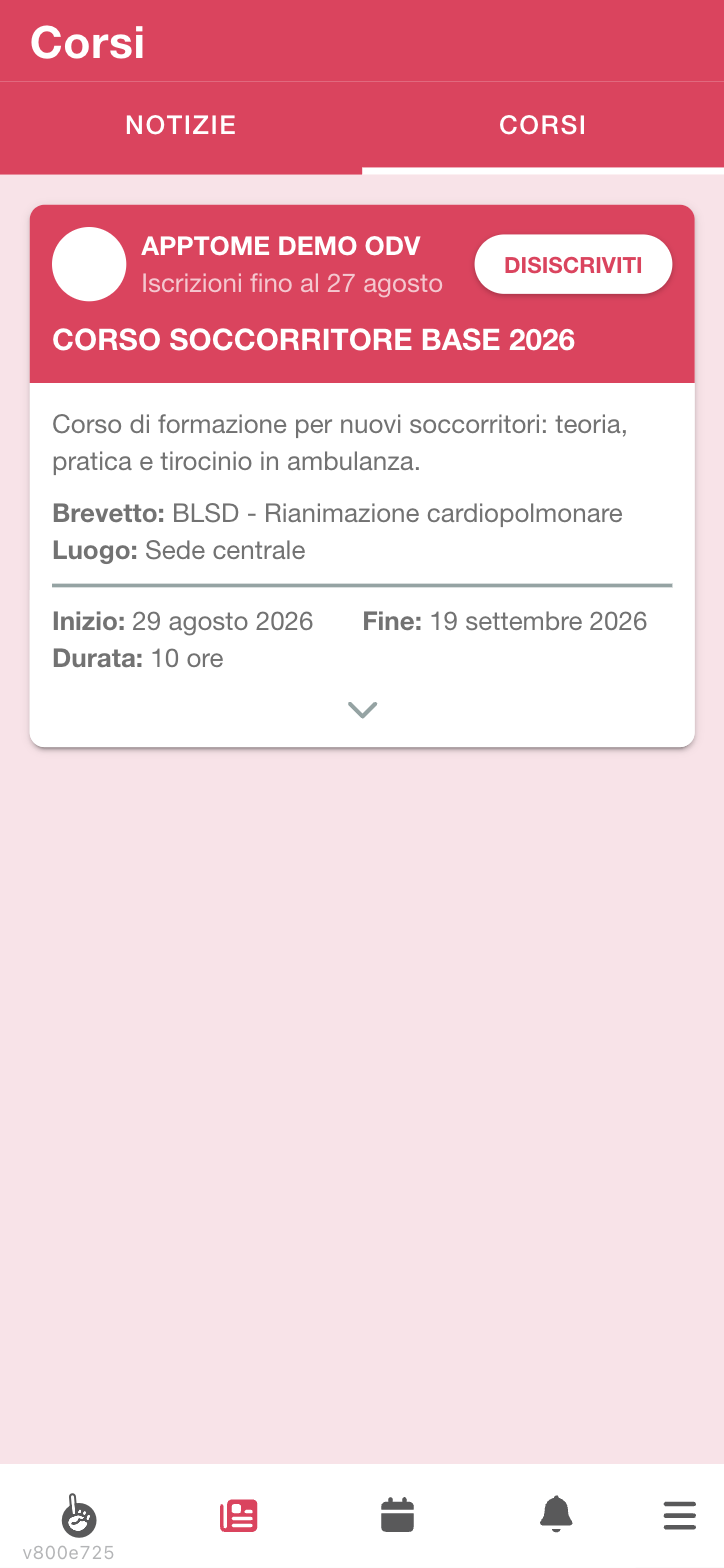
The arrow at the bottom of the card opens the rest: full description and lesson calendar.
Subscribing
On the course card tap Subscribe. From that moment the button becomes Unsubscribe: it is also the way to tell at a glance whether you are in.
If the organization requires approval, you stay in Subscription pending until a manager confirms.
Why a course does not appear or does not open
The list does not contain all the organization's courses: it contains the ones you can subscribe to, plus the ones you are already in. A course disappears from the list when:
- subscriptions are closed — the Subscriptions until date has passed;
- places have run out — the course has a maximum number of subscribers, counted among approved subscriptions;
- you lack the necessary skills — some courses require you to already have certain tasks, typically because they are a second level;
- it is not open to self-subscription — there are courses where the organization decides who takes part: you see them only after they have subscribed you.
To cancel your subscription tap Unsubscribe. Do it as soon as you know you will not take part: if the course has limited places, your place blocks someone else.
Lessons and attendance
The course has a Calendar of lessons: for each one you see the date, the start and end time, Teacher and Place. Lessons also appear in the Dashboard, in the What's next? card, together with shifts.
Attendance is recorded by whoever runs the course, not by you. In some courses it is clocking that marks you present: if the course provides for it, clocking at the start of the lesson records attendance by itself (see Clockings).
How you get to the exam
Attendance is not a formality: it is the condition for being admitted to the exam. AppToMe checks three things, and all must hold:
- the lesson hours attended reach the minimum attendance required by the course — a percentage of the total duration of the lessons, not a number of lessons. The count is in hours: skipping two short lessons weighs less than skipping one long one;
- the internship hours reach the planned total. The internship is not recorded separately: it is the hours of the shifts you did, in the course's internship period and on the shift types the course recognises. If you made yourself available only for part of the shift, only those hours count;
- you have the tasks possibly required to sit the exam.
If you are told you are not admitted, it is almost always the internship: shifts done outside the period or on calendars the course does not recognise do not count, however useful they were.
Your certifications
The certifications you obtained are recorded in your registry record, with the date achieved and — if they expire — the expiry date. From the app you cannot see them yourself: if you want to know which ones you have and when they expire, ask a manager — or look at which shifts you can cover, which is the practical consequence of having them.
A certification grants one or more tasks: that is how passing a course opens up shifts you could not cover before. And the reverse holds — on expiry, the linked task lapses and those shifts stop being yours. It is not a punishment, it is the reason the certification exists.
The expiry is calculated from the date achieved, according to the validity set for that certification — some certifications never expire, and then the date only serves to remember when you got them. AppToMe warns with the planned notice — often a month — if the organization has enabled the notification: that warning also arrives by email, and it is the moment to move for the renewal, not the day of expiry.