MCP server
The MCP (Model Context Protocol) server lets an AI assistant work on the AppToMe calendar on behalf of a person: Claude, ChatGPT, Claude Code, or any MCP client. People who use the assistant find the simple steps in AI assistant; this page is for those who want to know how it works or connect a different client.
Info
Available only if the API and AI assistants module is active.
The address
https://1<id>.backends.apptome.it/api/v1/mcp
The app shows it, ready to copy, on the AI assistant page (menu, at the bottom), under Address to paste into the assistant.
No keys: OAuth
The MCP server does not use API keys, and an API key sent here gets 401. Each person connects their own assistant by signing in with their account and giving consent. The assistant acts on their behalf, with their permissions, read at every request: if a permission is taken away, the assistant loses it from the next request.
The client runs the authorization flow by itself:
- the first request without a token gets 401 with
WWW-Authenticate: Bearer resource_metadata="…"; - the client reads the resource metadata
(
/.well-known/oauth-protected-resource/api/v1/mcp), which name the AppToMe gateway as the authorization server; - it registers (dynamic registration, RFC 7591) and opens the AppToMe page in
the browser, with PKCE (
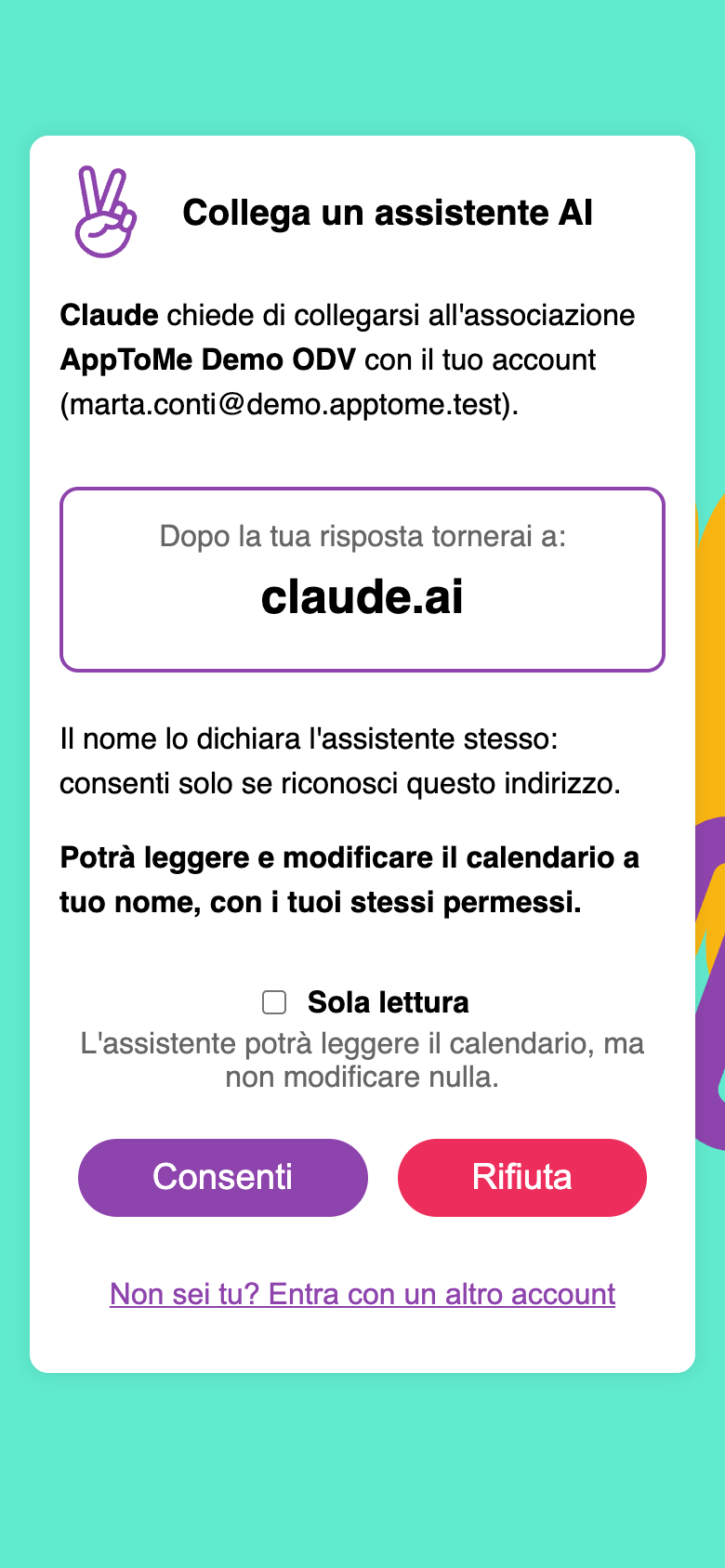
S256, required) and theresourceparameter set to the MCP address: from it the gateway works out the organization; - the person signs in, with their password or with the code by email, and on the Connect an AI assistant page chooses Allow;
- the client gets an access token, valid for 15 minutes, and a refresh token. The refresh token changes at every use and expires after 90 days unused: an assistant left idle for three months must be connected again.
The consent page names the assistant, the organization, the account and the
address the person goes back to after answering: "Claude asks to connect to …
with your account (…)", then After your answer you will go back to: and the
host of the redirect_uri. The assistant's name is the client_name the client
declared when registering: that is why the page also shows the address.
Whoever allows can tick Read only. The link then does not list the tools
that write and refuses them if called, with dry_run too, with the code read_only; the access token
carries the claim ro: true.
The refused token
On the MCP endpoint a missing or invalid token gets a 401 with the code
invalid_token (where REST says invalid_key) and WWW-Authenticate: Bearer
resource_metadata="…". When a token was sent and refused (expired, link
revoked), the header adds error="invalid_token", as OAuth requires (RFC 6750):
the client refreshes the token or, if the refresh is refused too, runs the
authorization flow again.
Connecting a client
Claude (website or app): Settings → Connectors → Add custom connector, a name (for example AppToMe) and the MCP address.
ChatGPT: Settings → Connectors (in some versions Apps), a custom connector with the MCP address. Some plans do not have custom connectors, or need them turned on separately.
Claude Code:
claude mcp add --transport http apptome https://1XXXX.backends.apptome.it/api/v1/mcp
Then, inside Claude Code, /mcp: choose apptome and authenticate. The
browser opens on the AppToMe page.
Other clients (MCP Inspector, Cursor…): they need the Streamable HTTP
transport with OAuth. The server is stateless: one JSON answer per request, no
SSE stream and no session. GET gets 405. Protocol revisions: 2025-03-26,
2025-06-18, 2025-11-25. A request with an Origin header from another site
gets 403.
The tools
An assistant sees in tools/list only the tools the person can use: a
volunteer does not get create_shift, list_people or find_candidates,
someone whose record was removed from the registry does not get sign_up,
withdraw or answer_invite. Dates are
YYYY-MM-DD, times ISO 8601 in the organization's time zone.
| Tool | What it does | Who can use it |
|---|---|---|
whoami |
whom the assistant acts for: person (null when their record was removed from the registry), role, permissions, time zone |
everyone |
get_organization |
ids and names of calendars, shift types, tasks (groups for the staff); for each shift type its priority, its requirements (task, minimum and maximum people), its checklist types and, for the staff, whether they can create it (can_create) |
everyone |
list_shifts |
the shifts in a range; only_mine only those the person is on |
everyone, on the shifts the calendar shows them |
get_shift |
one shift, who is on it, what the person can do on it, which tasks they can sign up with (tasks_you_can_sign_up_for; for someone already on the shift, their current task first, then the ones they can change to). For each requirement (requirements) minimum, maximum, approved, free places (free_places) and whether it is met (verified); the vehicles (vehicles). To whoever manages the availabilities, also the invitations (invitations) and the other availabilities (other_availabilities) |
everyone, as above |
list_availabilities |
the approved availabilities in a range | everyone: their own; all with the statistics permission |
summarize_availabilities |
hours and shifts per person, calendar, type, task | administrators and staff with the statistics permission |
list_people |
searches people in the registry | administrators and staff with the permission to view the registry (visualize_people) |
sign_up |
signs the person up for a shift | anyone with a record in the registry, not removed |
withdraw |
takes the person off a shift | as above |
list_my_invites |
the open invitations the staff sent the person, with shift, task and expiry | as above |
answer_invite |
accepts or declines an invitation: accepting signs the person up for the shift with the invitation's task, already approved | as above |
assign_person |
puts a person on a shift | administrators and staff with manage_availabilities, within the calendars, types, days and hours of the permission |
unassign_person |
takes a person off a shift | as above |
find_candidates |
who can cover a requirement of a shift, in the same order as the app, with each one's status and whether they can be invited (can_invite) |
as above |
invite_person |
invites one person to cover a task on a shift: one call per person. Refused if the task is not a requirement of the shift or the person does not have it, if they are already invited, if they are absent or if the shift has already started | as above |
create_shift |
creates a shift or a series | administrators and staff with create_shift |
update_shift |
changes a shift, or the following ones of its series | administrators and staff: their own shifts, all with manage_other_shifts, past ones with edit_past_turn |
delete_shift |
deletes a shift, or the following ones of its series | as above |
The write tools take dry_run and notify whom the app would notify, as the
REST writes do. withdraw, unassign_person,
update_shift and delete_shift are marked destructive (destructiveHint):
clients ask for confirmation before using them. Lists stop at 50 rows, with
truncated: true. The Excel file does not go through the MCP server.
Results are compact JSON, to spare the assistant's context. In the rows of the
lists (list_shifts, list_availabilities, summarize_availabilities,
list_people) null or empty fields and created_at/updated_at are left out;
false and 0 stay. get_shift returns the whole shift, notes included
(note). With dry_run the tools on availabilities return id null, as
the REST does. update_shift moving
a shift into the past carries it out and warns past_shift. With dry_run,
create_shift and update_shift also return preview, the shift as the write
would leave it (see Writes), plus
calendar_name and shift_type_name to read back to the person before asking
for confirmation.
A tool error is a result with isError and the same error object as the
REST API (see Errors). The code invalid_arguments, MCP only,
means the call does not match the tool's input schema: an unknown name, a
required argument missing, a wrong JSON type. invalid_request comes instead
for values refused by the same checks as the REST API (dates, ids, ranges).
In both, fields uses the flat paths with dots and indexes (vehicles[1]).
tool_not_available, MCP only as well, comes when the call names a tool that
is not offered to that user.
The full list, with descriptions and arguments, is regenerated from the
backend with make api-reference (reference/mcp-tools.md in the manuals
repository).
Limits
| What | Limit | Past the limit |
|---|---|---|
| tool calls, per person | 300 per month | result with isError and code mcp_user_month |
| tool calls, per person | 100 per day | result with isError and code mcp_user_day |
| tool calls, per person | 30 per minute | HTTP 429, JSON-RPC error -32029, Retry-After |
| writes, per person | 10 per minute | HTTP 429, as above |
| writes, per person | 50 per day | result with isError and code quota_exceeded |
other messages (initialize, tools/list, ping) |
60 per minute per link | HTTP 429 |
| requests without a valid token | 120 per minute per IP address | HTTP 429 |
Only tools/call counts as a call. A person with two assistants connected
still has a single count. There is no shared ceiling for the organization:
each person has their own, and the REST API limits stay per organization (see
Limits and usage). X-Quota-Limit and X-Quota-Remaining report
the person's monthly ceiling.
At 80% and 100% of the monthly and the daily ceiling the person gets an email. They see their own monthly usage on the AI assistant page; the administrators see on the API keys page the month's total and Who uses it most. The per-person ceilings can be raised for the whole organization: write to info@apptome.it.
Revocation
- Everyone disconnects their own assistants from the AI assistant page.
- Administrators see and disconnect everyone's, in the All tab of the same page.
- Revocation is immediate, even in the middle of a conversation.
- Whoever changes their password or email, or signs out of all devices, loses all their links. API keys instead stay valid.
- Whoever leaves or is removed from the organization, or has their account deactivated or deleted, loses their links; the API keys they created there are revoked.
- With the module off the MCP server stops for everyone; the links are not deleted and work again when the module comes back.
The data and the assistant's provider
With the MCP server the organization's data reach the provider of the assistant chosen by each person (Anthropic for Claude, OpenAI for ChatGPT…), to answer their questions. The assistant sees only what that person already sees in the app. The organization stays the data controller: that is why the administrators see the list of links and can revoke them, and the module off stops them all. What the provider does with the data is in its own terms, not AppToMe's.